Laminate & vinyl
Calculate laminate and vinyl – with a real layout preview.
Enter your room and plank format and you see every row on the floor plan: laying direction, stagger, cuts at the wall. Instead of the rough m²-plus-10 % formula you get the number of planks including waste and reserve – the basis for ordering the right number of packs.
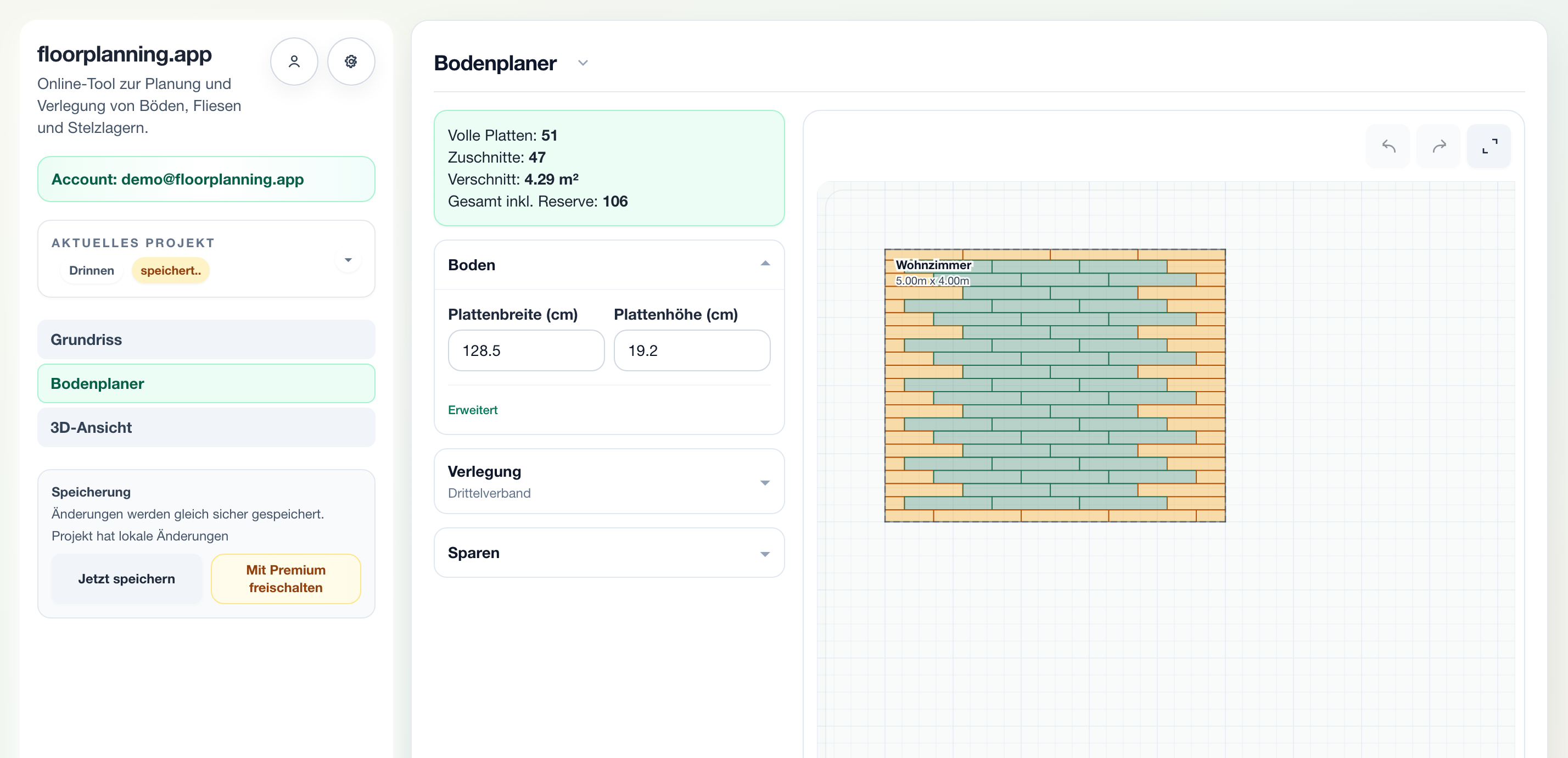
Your room, your plank, your layout
Enter plank width and length like a tile format – for example 128.5 × 19.2 cm. The tool lays the rows into your real floor plan and highlights every plank that gets cut at a wall or door. You see what the room really consumes before buying.
What matters in practice
Compare direction and stagger directly
Along the light or along the long wall? Third offset or random stagger? Switch direction and pattern with one click and instantly see how look and cuts change – without opening a single pack.
From planks to packs
The result gives you the total number of planks including reserve. Every pack states how many planks it contains – divide the total by the pack content, round up, done. Order once correctly instead of twice too tightly.

Planks, cuts and waste at a glance
A 5 × 4 m living room in third offset: 51 full planks, 47 cuts, 4.3 m² of waste – 106 planks including reserve. That is the number you need at the checkout, not the bare square metre area.
What the laminate calculator actually delivers
Instead of an m² formula you get a real layout: every row, every cut, every plank. The result is a quantity including reserve that you can convert directly into packs.
- Calculate laminate, vinyl and planks on the real floor plan
- Compare direction and stagger (third, random)
- Full planks, cuts and waste listed separately
- Total demand including adjustable reserve
To the pack count in 3 steps
1. Create room
Capture the layout including alcoves and doors.
2. Enter plank
Set plank size, stagger and direction and compare variants.
3. Derive packs
Divide the total incl. reserve by planks per pack and round up.
Common questions
Does the calculator work for laminate, vinyl and parquet?
Yes. Click laminate, click vinyl and plank parquet follow the same logic: rectangular format, staggered rows, cuts at the edge. Just enter the plank dimensions of your product.
How much waste does laminate produce?
As a rule of thumb 5–10 % for straight laying, more for diagonal. Counting from the real room is more accurate: the tool counts every cut plank individually and reports waste in m².
How do I convert planks into packs?
The packaging states the pack content (number of planks or m²). Divide the total including reserve by planks per pack and round up. Offcuts from finished rows start the next row.
Related guides & calculators
Calculate laminate now
Create your room, enter the plank format and read off the quantity including reserve.