Offcut guide
Calculating offcuts when laying tiles
Offcuts appear wherever a full tile does not fit against the wall and gets cut. How many there are depends on format, joint, layout and orientation – you cannot estimate that in your head. floorplanning.app counts every cut tile individually, reports the waste in m² and gives you the total quantity including reserve. So before buying you know how many tiles you really need.
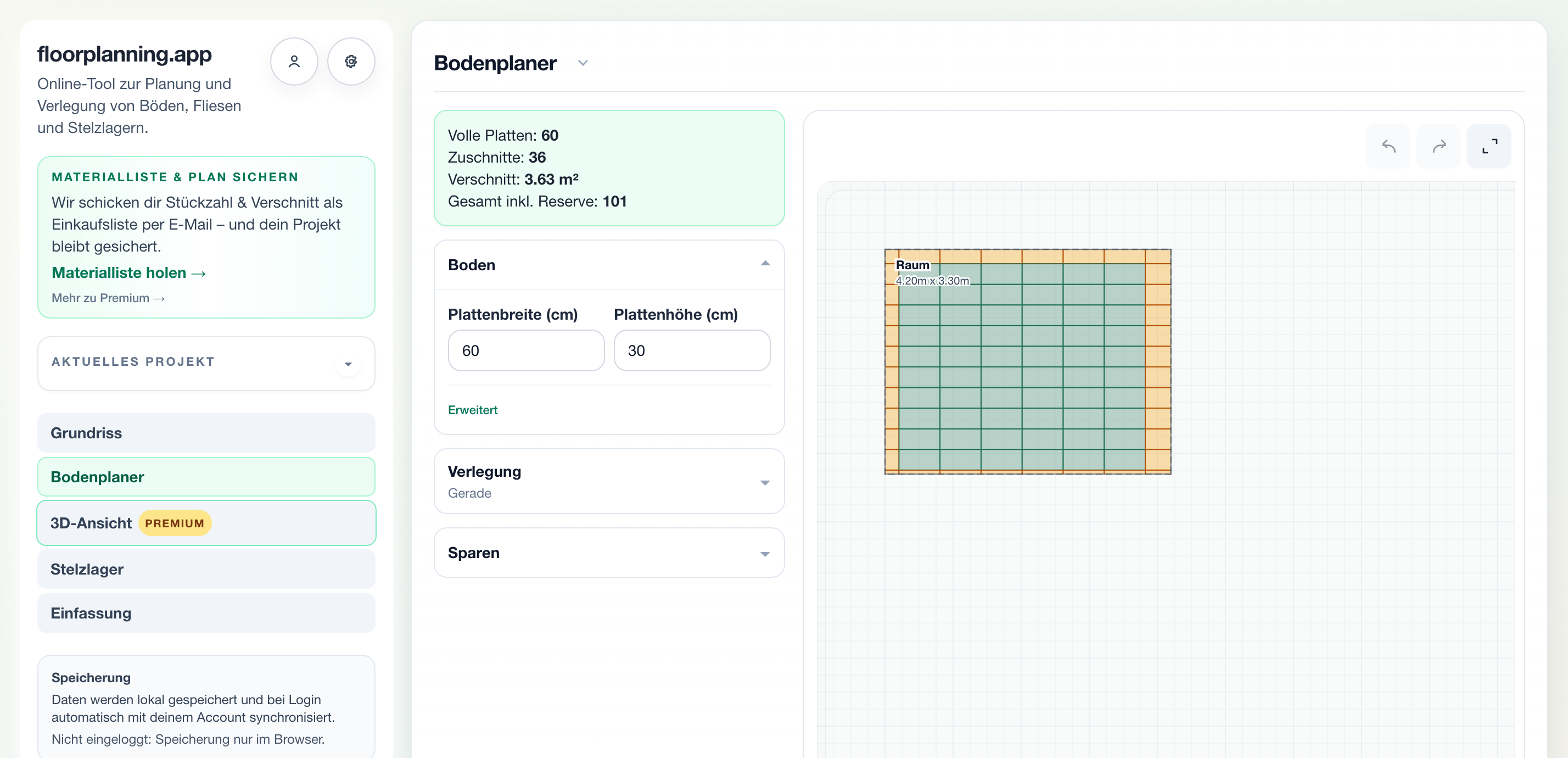
Every cut is counted visibly
On the floor plan you instantly recognise full tiles and cuts – the edge tiles are highlighted. The tool does not just add a flat “+10 %” but counts every cut tile individually, based on your actual geometry. That is the basis for calculating offcuts realistically instead of guessing.
What matters in practice
Waste in m² instead of gut feeling
Besides the tile count you get the waste as an area in m². That makes the difference between layouts tangible: a diagonal or herringbone layout produces more cuts than a straight one – how much more you see in numbers instead of afterwards in the skip.
Reserve cleanly included
A buffer for breakage, later repairs and mis-cuts belongs in the plan. You set the reserve percentage yourself and the total quantity shows it transparently – so you do not blindly buy “one extra pallet” but a justified number of tiles.

Full tiles, cuts and waste, separated
The result separates cleanly: full tiles, number of cuts, waste in m² and the total including reserve. These four values are exactly what you need for a quote, purchasing and the build – traceable and without a spreadsheet.
What offcut calculation is used for in projects
A reliable bill of materials is the basis for quoting, purchasing and the build. Instead of flat percentages, the tool counts cuts from the real surface and reports waste in m² plus the total including reserve – traceable for client and tradesperson.
- Count cuts individually, not as a flat rate
- Waste as an area in m²
- Total including adjustable reserve
- Reliable basis for quote and purchasing
How to calculate offcuts
1. Area & format
Set the layout, tile format and joint width.
2. Choose pattern
Straight, diagonal or herringbone – the cuts change.
3. Read the result
Use cuts, waste and total incl. reserve.
Common questions
How much waste should I plan for tiles?
Rules of thumb like 5–10 % for straight and 10–15 % for diagonal or herringbone are only ballpark figures. It gets more accurate when the tool counts the cuts from your real surface – then the reserve is a deliberate addition rather than the only safety buffer.
Does the tool count offcuts or just square metres?
Both: you get the number of cut tiles and the waste as an area in m². So you see both how many tiles you break into and how much material is actually left over.
Does waste change with the layout pattern?
Yes, significantly. Straight layouts usually produce the fewest cuts, diagonal and herringbone more. Since the surface stays the same in the tool, you can compare the layouts directly against each other.
Related calculators & guides
Calculate offcuts now
Set area and format and read off cuts, waste and total demand directly.